
Main, Models, Push! Git Branching for ML Training
February 1, 2026So you want to start training models but don't know where to begin managing your models, tracking your experiments, and versioning your training code. You can use MLFlow or Weights & Biases to manage your models and experiments, but what about the code versioning? Training deep neural networks can be very tricky and require meticulous changes to the model's structure, the learning algorithm, and of course, the hyperparameters, so most likely, you won't get it right off the first rip. Your training code will most likely evolve over many versions and get better and better each time. Sometimes, you may want to run many experiments in parallel because you've identified that multiple versions (i.e. branches) of your training code are likely to work. How wonderful! Now we've identified that a proper git branching model can be appropriate for such a project. Let's begin with what I like to call: main-models-push.
Introductions
First of all, I would like to introduce myself as a Machine Learning Engineer with a good amount of experience training models from the ground up in startup mode. I've trained image classifiers, image segmentation models, large generative models for virtual try-on, and action policies for humanoid robots. After all of this experience, I've determined a working git branching model that has been quite a success for solo-to-small team development. Looking through the web today, I haven't seen anything standardized or seamless as this one. Many folks like to store their hyperparams in a .pkl file, maybe even zip the entire code and store these files as the model artifacts. As an experienced programmer who likes to use git, these methods don't work for me. I'd like to share my working git branching model with the world to hopefully help someone and start a discussion on what works for others.
Repo Scope
Let's begin by stating that the scope of the repo is solely for model training and evaluation allowing us to optimize our workflow for development ignoring deployment or any other applications of that model. Such other aspects are saved for another discussion
Development Branch is Main
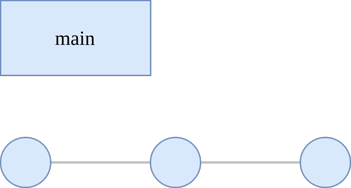
Main is our development branch. Whenever we want to make a new change, we push it to main. We can still branch off of main and make feature branches when working with a small team, but there's essentially no need to make a develop branch because of our narrow focus of model development.
The Models Branch
Now, here's the best part: let's create a new branch called models, which branches off main. The models branch is responsible for tracking the development lifecycle of all of your models. Why do we want this branch? Like I said before, your model's training code will most likely evolve over the course of development, and the best tool that I can think of to track changes for any code is git. Thus, you'll want to not only commit your code but also ensure to commit any configuration that may specify hyperparameters or anything that would consequently change how your model learns. It serves the purpose of tracking the model's lineage or version history allowing us to reproduce experiments, branch off of any particular commit, revert to a particular commit, tag a specific commit depending on the outcome of its training run, and ultimately, trigger a CI job for every commit. This branch is the most pivotal part of the branching model, and all other suggestions that I make are consequent recommendations that will make your life easier.
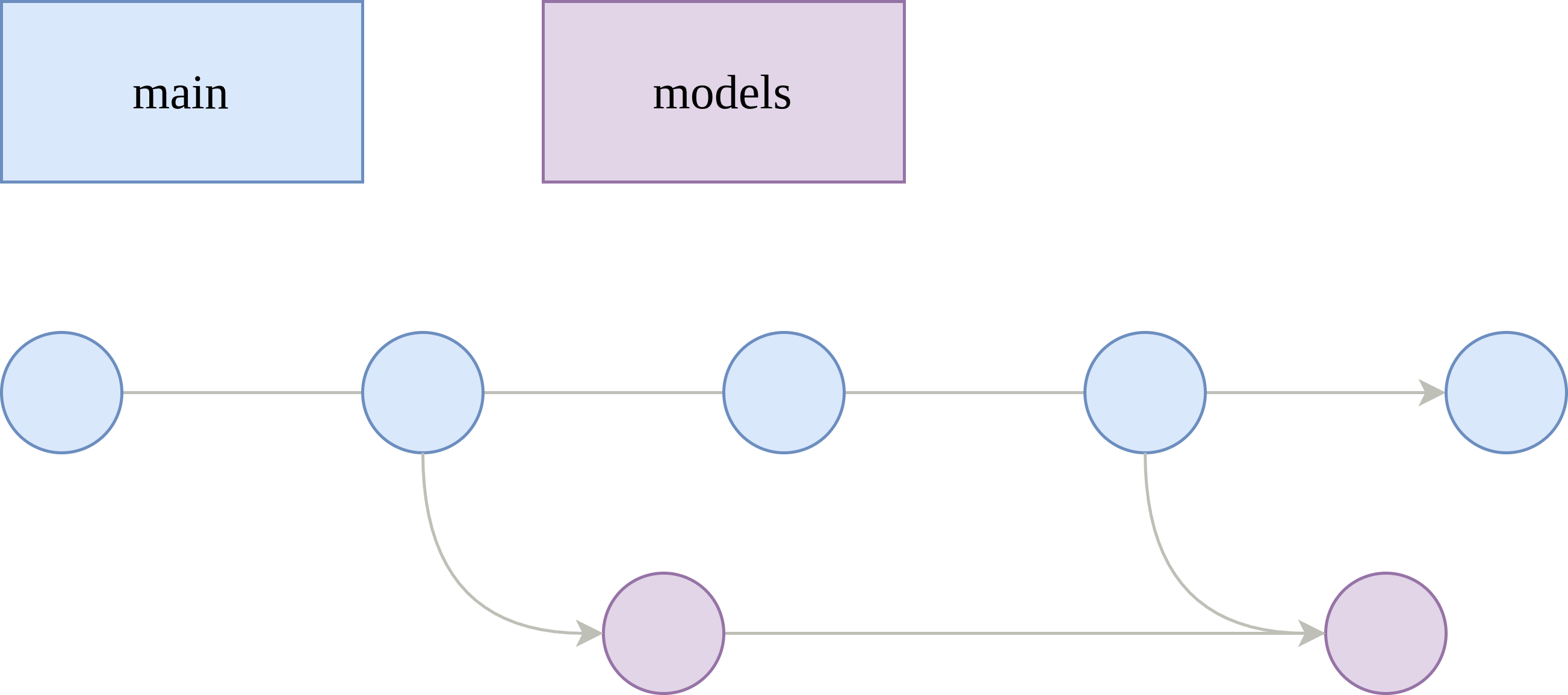
Even though we have this new models branch, we do not want to commit directly to models. You should only do fast-forward (FF) merges to it from main. If you're working alone, then you can commit directly to the main branch (instead of making PRs), and then, freely FF merge to models. Only when you want to train a new model or run an experiment, do you merge your main branch to the models branch. This means that a merge to models is equivalent to a training run submission, which works well with CI. While working in main, you can easily merge to models upstream with this 1 liner:
git push origin main:modelsIf you're working with a team, then you can create separate models/* branches, so your other teammates can run experiments in parallel. And of course, they can create their own development branch that merges to their own individual models/* branch. Then, they can FF merge like so:
git push origin my_branch:models/my_branchCI and Training Runs
This branching model is ultimately designed to work well with CI. Ideally, you'll have a CI job that triggers on commit to models and models/* and this job will build the docker container for your training code, push it to your container registry, and submit the training run to your Cloud provider (or on-prem training infrastructure). To link your training run with your model version, all you have to do is name your training run as the commit hash, or otherwise, the short hash, which is what I like to do. It's also wise to tag your docker images and associate any model artifacts and metrics with the commit hash or short hash.
For example, let's say the short hash is 5av32b0:
- Docker image: gcr.docker.io/dog-classifier:5av32b0
- Artifacts path: s3://my-models/artifacts/5av32b0
- Metrics path: s3://my-models/metrics/5av32b0
Depending on what you use to manage artifacts and metrics, it may look a little different, but the idea is that you include the commit hash, so you know what version of the code you can look back at.
A full working github actions workflow can be seen here:
name: Build Image and Train Model on SageMaker

on:
  push:
    branches:
      - 'models'
      - 'models/*'
    paths:
      - 'src/**'
      - 'deploy/**'
      - '.github/workflows/train_model.yml' # (This workflow file)

permissions:
  contents: read
  id-token: write

jobs:
  train:
    name: Build and Submit Training Job
    steps:
      - name: Checkout Code
        uses: actions/checkout@v4

      - name: Configure AWS Credentials
        uses: aws-actions/configure-aws-credentials@v4
        with:
          role-to-assume: ${{ secrets.AWS_ROLE_TO_ASSUME }}
          aws-region: ${{ secrets.AWS_REGION }}

      - name: Login to Amazon ECR
        id: login-ecr
        uses: aws-actions/amazon-ecr-login@v2

      - name: Calculate Short SHA
        id: short-sha
        run: echo "sha=$(git rev-parse --short HEAD)" >> $GITHUB_OUTPUT

      - name: Set up Docker Buildx
        uses: docker/setup-buildx-action@v3

      - name: Build and push to ECR
        uses: docker/build-push-action@v5
        with:
          context: src
          file: src/Dockerfile
          push: true
          tags: |
            ${{ steps.login-ecr.outputs.registry }}/sim/dog-classifier:${{ steps.short-sha.outputs.sha }}
            ${{ steps.login-ecr.outputs.registry }}/sim/dog-classifier:latest
          cache-from: type=registry,ref=${{ steps.login-ecr.outputs.registry }}/sim/dog-classifier:latest
          cache-to: type=inline

      - name: Set up Python
        uses: actions/setup-python@v5
        with:
          python-version: '3.10'

      - name: Install dependencies
        run: |
          python -m pip install --upgrade pip
          pip install boto3 pyyaml

      - name: Submit SageMaker Training Job
        env:
          SHORT_SHA: ${{ steps.short-sha.outputs.sha }}
        run: |
          python deploy/submit_sagemaker_job.py \
            --image-tag $SHORT_SHA \
            --job-name $SHORT_SHA \
            --config deploy/sagemaker-job-config.yaml \
            --hydra-config deploy/train-config.yaml
The above code job automatically grabs the short hash to identify the training run and tag the image, and it uses the current configuration that's committed to the repo. It also runs some python to submit the training run to AWS Sagemaker. Here's a snippet of that:
def submit_training_job(
    job_config_path: Path,
    hydra_config_path: Path,
    override_image_tag: str = None,
    override_job_name: str = None,
) -> str:
    """
    Submit SageMaker training job with Hydra configuration.

    Args:
        job_config_path: Path to SageMaker job configuration YAML
        hydra_config_path: Path to Hydra overrides YAML

    Returns:
        Training job name
    """
    # Load SageMaker job configuration
    with open(job_config_path, "r") as f:
        job_config = yaml.safe_load(f)

    # Extract configuration values
    job_name = override_job_name if override_job_name else job_config["job"]["name"]
    instance_type = job_config["job"]["instance_type"]
    instance_count = job_config["job"].get("instance_count", 1)
    volume_size = job_config["job"]["volume_size"]
    max_runtime = job_config["job"]["max_runtime"]

    aws_region = job_config["aws"]["region"]
    ecr_repository = job_config["aws"]["ecr_repository"]
    image_tag = (
        override_image_tag if override_image_tag else job_config["aws"]["image_tag"]
    )
    s3_bucket = job_config["aws"]["s3_bucket"]
    s3_prefix = job_config["aws"]["s3_prefix"]
    spot_enabled = job_config["aws"].get("spot_enabled", False)

    tags = job_config.get("tags", {})

    # Check if distributed training is enabled
    distributed_enabled = instance_count > 1

    # Get AWS account ID and construct image URI
    account_id = get_aws_account_id()
    image_uri = (
        f"{account_id}.dkr.ecr.{aws_region}.amazonaws.com/{ecr_repository}:{image_tag}"
    )

    # Convert Hydra config to command-line overrides
    hydra_overrides = yaml_to_hydra_overrides(hydra_config_path)

    # Build container arguments
    # Start with the base command
    container_arguments = ["python", "your_training_script.py"]

    # Add all Hydra overrides
    for override in hydra_overrides:
        container_arguments.append(override)

    # Explicitly override experiment_name to match the SageMaker job name
    # This ensures logs are stored in a unique directory (e.g. s3://.../checkpoints/<commit_hash>/)
    container_arguments.append(f"experiment_name={job_name}")

    print(f"Creating SageMaker training job: {job_name}")
    print(f"Instance type: {instance_type}")
    print(f"Instance count: {instance_count}")
    print(f"Distributed training: {'Enabled' if distributed_enabled else 'Disabled'}")
    print(f"Training image: {image_uri}")
    print(f"S3 output: s3://{s3_bucket}/{s3_prefix}/output")
    print(f"\nHydra overrides ({len(hydra_overrides)}):")
    for override in hydra_overrides[:10]:  # Show first 10
        print(f"  {override}")
    if len(hydra_overrides) > 10:
        print(f"  ... and {len(hydra_overrides) - 10} more")

    # Create SageMaker client
    sagemaker = boto3.client("sagemaker", region_name=aws_region)

    # Prepare tags
    tag_list = [{"Key": k, "Value": str(v)} for k, v in tags.items()]

    stopping_condition = {
        "MaxRuntimeInSeconds": max_runtime,
    }
    if spot_enabled:
        stopping_condition["MaxWaitTimeInSeconds"] = max_runtime + 24 * 3600

    # Create training job
    response = sagemaker.create_training_job(
        TrainingJobName=job_name,
        AlgorithmSpecification={
            "TrainingImage": image_uri,
            "TrainingInputMode": "File",
            "ContainerArguments": container_arguments,
        },
        RoleArn=f"arn:aws:iam::{account_id}:role/sagemaker_execution_role",
        InputDataConfig=[
            {
                "ChannelName": "assets",
                "DataSource": {
                    "S3DataSource": {
                        "S3DataType": "S3Prefix",
                        "S3Uri": f"s3://{s3_bucket}/assets/",
                        "S3DataDistributionType": "FullyReplicated",
                    }
                },
                "ContentType": "application/octet-stream",
                "CompressionType": "None",
            }
        ],
        ResourceConfig={
            "InstanceCount": instance_count,
            "InstanceType": instance_type,
            "VolumeSizeInGB": volume_size,
        },
        StoppingCondition=stopping_condition,
        OutputDataConfig={"S3OutputPath": f"s3://{s3_bucket}/{s3_prefix}/output"},
        CheckpointConfig={
            "S3Uri": f"s3://{s3_bucket}/{s3_prefix}/checkpoints/",
            "LocalPath": "/opt/ml/checkpoints",
        },
        EnableNetworkIsolation=False,
        EnableInterContainerTrafficEncryption=False,
        EnableManagedSpotTraining=spot_enabled,
        Tags=tag_list,
    )
That's essentially all you need to know. Let me know if this works for you or your team. If you have any suggestions to improve this workflow, my DMs are open.